

- Storage class: choose a class available in the basin’s location. This controls append latency, not durability. All classes are regionally durable. See Architecture: Storage classes.
- Retention: how long records stick around. Defaults to 7 days. See Retention.
- Auto-creation: whether streams are created implicitly on first append or read, useful when you have many short-lived or dynamic streams.
- Stream encryption: optionally require request-time encryption keys for newly created streams. See Encryption.
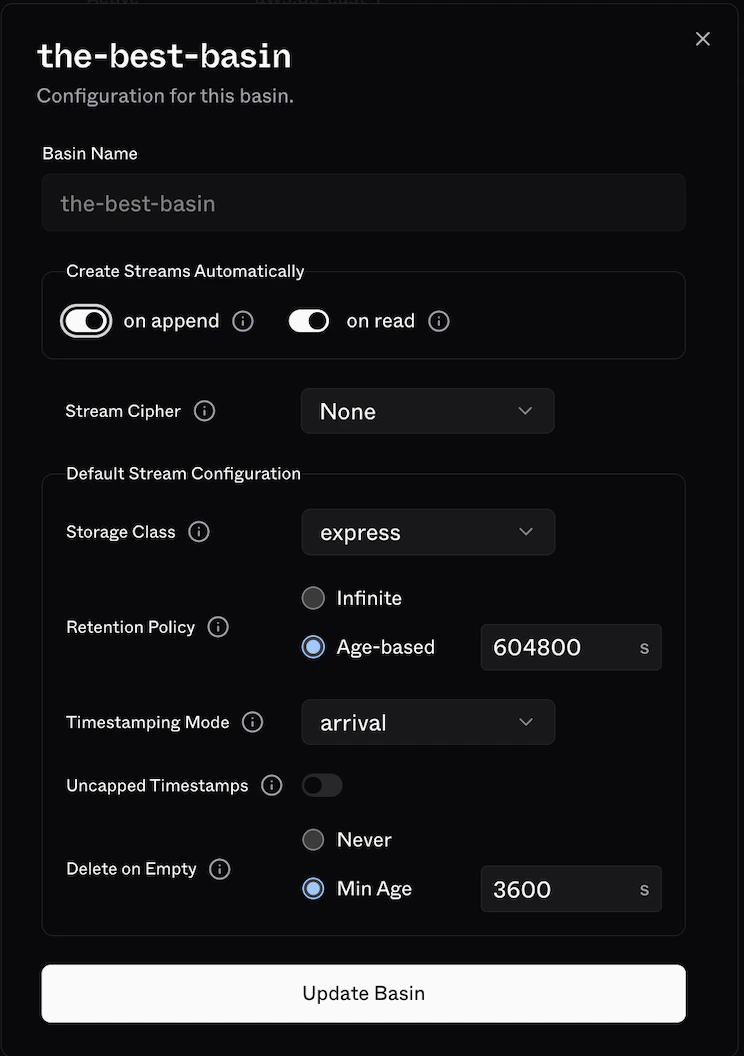
Stream config
For the full set of fields, see the create and reconfigure API docs, or the docs for the SDK you are using.Encryption is configured on the basin, not in
StreamConfig. A stream captures the basin’s stream_cipher when it is created and keeps that cipher for life. See Encryption.Storage class selection
Use List locations to check each location’s available storage classes and default for your account, or use the CLI:- A new basin without an explicit
default_stream_config.storage_classuses its location’s default. - A new stream without an explicit
storage_classuses its basin’s default stream configuration. - Changing a basin’s default affects subsequently created streams. It does not change existing streams.
Retention
S2 is designed to accommodate both infinite accumulation of data and time-bounded retention. You can use a stream as the long-term source of truth for your data, or as a momentary durable buffer on the way to somewhere else. A retention policy can be configured on a stream, and S2 will automatically delete records that are older than the configured threshold. This can be set when creating a stream or by reconfiguring an existing one.Records may stay visible for a brief period after their retention window expires, typically on the order of minutes.
Delete on empty
When enabled, a stream is automatically deleted once all its records have been trimmed and the stream is empty. Themin_age_secs field requires the stream to have existed for at least that long before it can be auto-deleted.
Useful for ephemeral streams, e.g. one stream per job run where the data is consumed and no longer needed.
Timestamping
Every record has a timestamp alongside its sequence number, and reads can start from a timestamp.timestamping.mode controls which clock is used:
client-prefer(default): use the client timestamp when present, otherwise use S2 arrival time.client-require: require the client to provide a timestamp.arrival: always use S2 arrival time, in milliseconds since the Unix epoch.
timestamping.uncapped to true when your timestamp scale is not wall-clock time.